During forensic investigations, analyzing registry hives involves staring at thousands of lines of log output. RegRipper is the standard tool for this, but its text output can be dense and hard to parse visually.
I built the RegRipper Language Support extension for VS Code to make this process less painful. It adds syntax highlighting, outline navigation, and structure to .regripper logs.
Why do we need this?
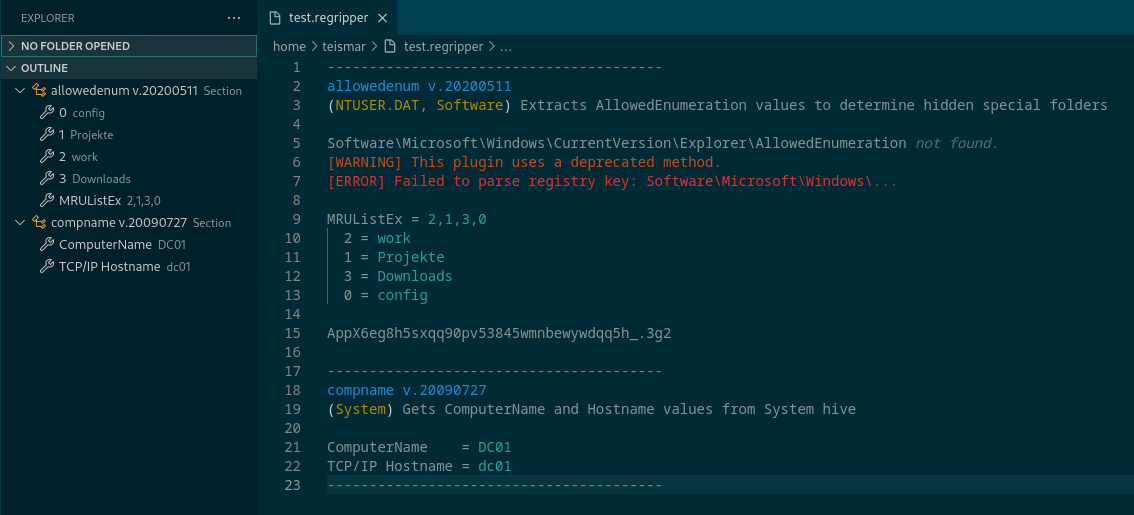
Raw RegRipper output is just plain text. Without highlighting, timestamps blend into keys, and warnings get lost in the noise. This extension treats RegRipper output as a language, parsing its structure to give you:
- Syntax Highlighting: distinct colors for timestamps, registry keys, hives, and plugin names.
- Error Detection:
[WARNING]and[ERROR]lines are highlighted in red/orange so you don’t miss parsing failures. - Outline Navigation: The VS Code “Outline” view is populated with plugin sections, allowing you to jump instantly between
UserAssist,ShimCache, or any other plugin output without scrolling manually.
Screenshot
Features
- Timestamps: Unique highlighting to make timeline analysis easier.
- Key-Value Pair Parsing: Separates keys from values visually.
- Collapsible Sections: (If supported by your theme/VS Code config) code folding for plugin sections.
Get it
You can install it directly from the VS Code Marketplace or check out the source on GitHub.